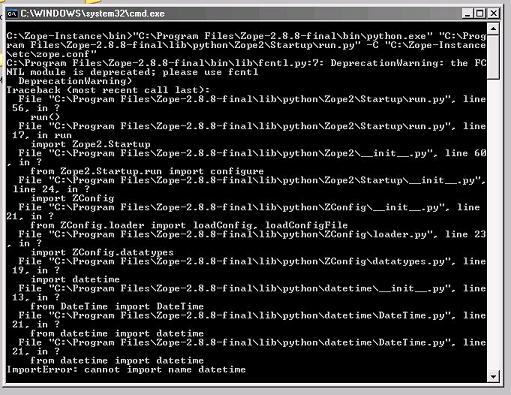
Here is the .bat file: @set PYTHON=C:\Program Files\Zope-2.8.8-final\bin\python.exe @set ZOPE_HOME=C:\Program Files\Zope-2.8.8-final @set INSTANCE_HOME=C:\Zope-Instance @set SOFTWARE_HOME=C:\Program Files\Zope-2.8.8-final\lib\python @set CONFIG_FILE=C:\Zope-Instance\etc\zope.conf @set PYTHONPATH=%SOFTWARE_HOME% @set ZOPE_RUN=%SOFTWARE_HOME%\Zope2\Startup\run.py "%PYTHON%" "%ZOPE_RUN%" -C "%CONFIG_FILE%" %1 %2 %3 %4 %5 %6 %7 pause It is exactly as provided in the Zope 2.8.8 installation kit, except that I added the pause at the end so I could take a screen shot. I run it just by clicking on its Windows icon, so there are no calling parameters. I just noticed that the screen shot I sent earlier did not show the whole session, so I attach a complete one here. Yes, ...ateTime\DateTuime.py my last message was a typo. ~ Thanks again ~ Ken -----Original Message----- From: rawsystems@gmail.com [mailto:rawsystems@gmail.com] Sent: Thursday, January 18, 2007 10:19 PM To: Ken Winter; 'Zope List' Subject: Re: [Zope] FW: Problem Starting Zope after Installation I wonder why it was not cased in the output in your first message. This is strange. Which batch file do you start it with? can you post it here? Which version of python are you using? (just for giggles) Bobb PS: If you're early in the installation... which you are it looks like you may want to "punt" and try it again. PSS: I assume your ...ateTime\DateTuime.py below is a typeo, otherwise, that's your problem.