FW: Problem Starting Zope after Installation

Hi Zope ~ I just installed Zope 2.8.8 (version selected to match a server I'm developing for) on my Windows XP machine, using the instructions in the Zope Book (http://www.plope.com/Books/2_7Edition/InstallingZope.stx#0-0), and electing not to run it as a service. I can't get it to start - see the attached screen shot for the failure messages. ~ TIA ~ Ken
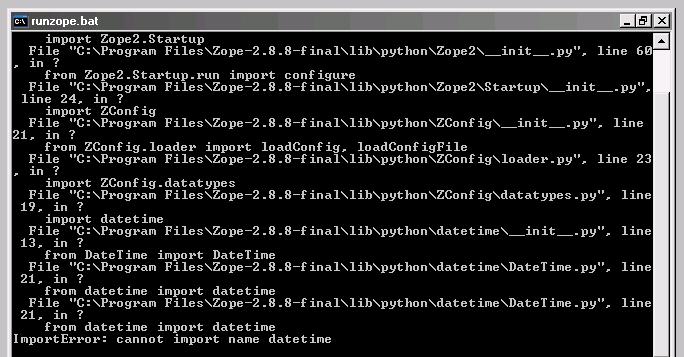

What version of python are you running? (you need 2.3.4 or better) Jonathan ----- Original Message ----- From: Ken Winter To: Zope List Sent: Thursday, January 18, 2007 2:40 PM Subject: [Zope] FW: Problem Starting Zope after Installation Hi Zope ~ I just installed Zope 2.8.8 (version selected to match a server I'm developing for) on my Windows XP machine, using the instructions in the Zope Book (http://www.plope.com/Books/2_7Edition/InstallingZope.stx#0-0), and electing not to run it as a service. I can't get it to start - see the attached screen shot for the failure messages. ~ TIA ~ Ken ------------------------------------------------------------------------------ _______________________________________________ Zope maillist - Zope@zope.org http://mail.zope.org/mailman/listinfo/zope ** No cross posts or HTML encoding! ** (Related lists - http://mail.zope.org/mailman/listinfo/zope-announce http://mail.zope.org/mailman/listinfo/zope-dev )
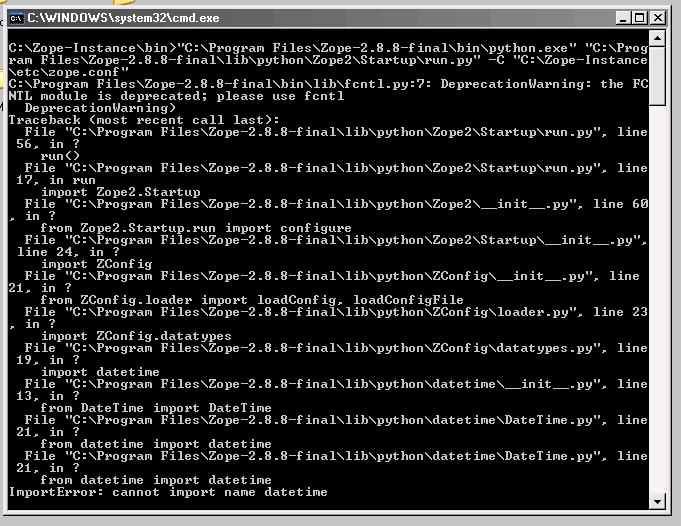
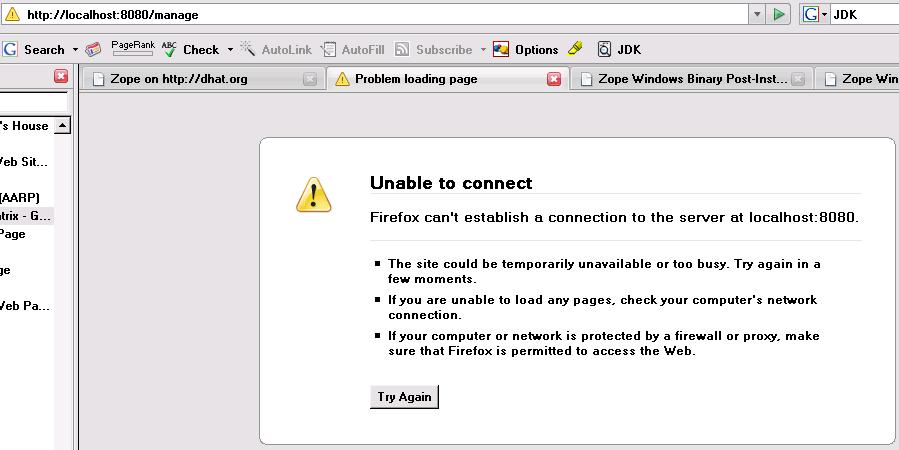
Jonathan ~ I didn't have any version of Python installed! I was wondering about Python. But since nothing I saw in the installation sequence or the Zope Book said otherwise, I figured maybe it was built into the Zope package. I guess no one who wrote this stuff ever guessed that anyone would not know something so "obvious". So. 1. I installed Python 2.3.5 (again matching the version on my target server), tried to start the previously installed Zope. and got the same error again. 2. I uninstalled and reinstalled Zope 2.8.8, and tried to start it and run the ZMI. Same error (see attachment 02 for the command line results and 03 for the ZMI error). I have tried to do everything in a very standard way, and my whole system is fairly new, so less likely than some to be contaminated by history. Any other suggestions? ~ Thanks ~ Ken -----Original Message----- From: Jonathan [mailto:dev101@magma.ca] Sent: Thursday, January 18, 2007 2:50 PM To: Ken Winter; Zope List Subject: Re: [Zope] FW: Problem Starting Zope after Installation What version of python are you running? (you need 2.3.4 or better) Jonathan ----- Original Message ----- From: Ken Winter <mailto:ken@sunward.org> To: Zope List <mailto:zope@zope.org> Sent: Thursday, January 18, 2007 2:40 PM Subject: [Zope] FW: Problem Starting Zope after Installation Hi Zope ~ I just installed Zope 2.8.8 (version selected to match a server I'm developing for) on my Windows XP machine, using the instructions in the Zope Book (http://www.plope.com/Books/2_7Edition/InstallingZope.stx#0-0), and electing not to run it as a service. I can't get it to start - see the attached screen shot for the failure messages. ~ TIA ~ Ken _____ _______________________________________________ Zope maillist - Zope@zope.org http://mail.zope.org/mailman/listinfo/zope ** No cross posts or HTML encoding! ** (Related lists - http://mail.zope.org/mailman/listinfo/zope-announce http://mail.zope.org/mailman/listinfo/zope-dev )

your datetime directory should be named DateTime... Case matters. hth bobb ----- Original Message ----- From: Ken Winter To: Zope List Sent: Thursday, January 18, 2007 2:40 PM Subject: [Zope] FW: Problem Starting Zope after Installation Hi Zope ~ I just installed Zope 2.8.8 (version selected to match a server I'm developing for) on my Windows XP machine, using the instructions in the Zope Book (http://www.plope.com/Books/2_7Edition/InstallingZope.stx#0-0), and electing not to run it as a service. I can't get it to start - see the attached screen shot for the failure messages. ~ TIA ~ Ken ------------------------------------------------------------------------------ _______________________________________________ Zope maillist - Zope@zope.org http://mail.zope.org/mailman/listinfo/zope ** No cross posts or HTML encoding! ** (Related lists - http://mail.zope.org/mailman/listinfo/zope-announce http://mail.zope.org/mailman/listinfo/zope-dev )
I searched my C: drive for everything with "datetime" (any case) in the title. The only relevant "datetime" (any case) *folder* is C:\Program Files\Zope-2.8.8-final\lib\python\DateTime\, and it is correctly cased. There are lots of *files* with "datetime" (various cases) in their names, e.g. C:\Program Files\Zope-2.8.8-final\lib\python\DateTime\DateTuime.py and C:\Program Files\Zope-2.8.8-final\bin\DLLs\datetime.pyd. Could any of these be relevant? ~ Thanks ~ Ken -----Original Message----- From: rawsystems@gmail.com [mailto:rawsystems@gmail.com] Sent: Thursday, January 18, 2007 7:44 PM To: Ken Winter; Zope List Subject: Re: [Zope] FW: Problem Starting Zope after Installation your datetime directory should be named DateTime... Case matters. hth bobb ----- Original Message ----- From: Ken Winter <mailto:ken@sunward.org> To: Zope List <mailto:zope@zope.org> Sent: Thursday, January 18, 2007 2:40 PM Subject: [Zope] FW: Problem Starting Zope after Installation Hi Zope ~ I just installed Zope 2.8.8 (version selected to match a server I'm developing for) on my Windows XP machine, using the instructions in the Zope Book (http://www.plope.com/Books/2_7Edition/InstallingZope.stx#0-0), and electing not to run it as a service. I can't get it to start - see the attached screen shot for the failure messages. ~ TIA ~ Ken _____ _______________________________________________ Zope maillist - Zope@zope.org http://mail.zope.org/mailman/listinfo/zope ** No cross posts or HTML encoding! ** (Related lists - http://mail.zope.org/mailman/listinfo/zope-announce http://mail.zope.org/mailman/listinfo/zope-dev )
I wonder why it was not cased in the output in your first message. This is strange. Which batch file do you start it with? can you post it here? Which version of python are you using? (just for giggles) Bobb PS: If you're early in the installation... which you are it looks like you may want to "punt" and try it again. PSS: I assume your ...ateTime\DateTuime.py below is a typeo, otherwise, that's your problem. ----- Original Message ----- From: Ken Winter To: rawsystems@gmail.com ; 'Zope List' Sent: Thursday, January 18, 2007 8:05 PM Subject: RE: [Zope] FW: Problem Starting Zope after Installation I searched my C: drive for everything with "datetime" (any case) in the title. The only relevant "datetime" (any case) *folder* is C:\Program Files\Zope-2.8.8-final\lib\python\DateTime\, and it is correctly cased. There are lots of *files* with "datetime" (various cases) in their names, e.g. C:\Program Files\Zope-2.8.8-final\lib\python\DateTime\DateTuime.py and C:\Program Files\Zope-2.8.8-final\bin\DLLs\datetime.pyd. Could any of these be relevant? ~ Thanks ~ Ken -----Original Message----- From: rawsystems@gmail.com [mailto:rawsystems@gmail.com] Sent: Thursday, January 18, 2007 7:44 PM To: Ken Winter; Zope List Subject: Re: [Zope] FW: Problem Starting Zope after Installation your datetime directory should be named DateTime... Case matters. hth bobb ----- Original Message ----- From: Ken Winter To: Zope List Sent: Thursday, January 18, 2007 2:40 PM Subject: [Zope] FW: Problem Starting Zope after Installation Hi Zope ~ I just installed Zope 2.8.8 (version selected to match a server I'm developing for) on my Windows XP machine, using the instructions in the Zope Book (http://www.plope.com/Books/2_7Edition/InstallingZope.stx#0-0), and electing not to run it as a service. I can't get it to start - see the attached screen shot for the failure messages. ~ TIA ~ Ken ---------------------------------------------------------------------------- _______________________________________________ Zope maillist - Zope@zope.org http://mail.zope.org/mailman/listinfo/zope ** No cross posts or HTML encoding! ** (Related lists - http://mail.zope.org/mailman/listinfo/zope-announce http://mail.zope.org/mailman/listinfo/zope-dev ) ------------------------------------------------------------------------------ _______________________________________________ Zope maillist - Zope@zope.org http://mail.zope.org/mailman/listinfo/zope ** No cross posts or HTML encoding! ** (Related lists - http://mail.zope.org/mailman/listinfo/zope-announce http://mail.zope.org/mailman/listinfo/zope-dev )
I forgot to answer one question: the Python I'm using is 2.3.5. (As with Zope, I chose this version to match the version on the server I'm developing for.) -----Original Message----- From: rawsystems@gmail.com [mailto:rawsystems@gmail.com] Sent: Thursday, January 18, 2007 10:19 PM To: Ken Winter; 'Zope List' Subject: Re: [Zope] FW: Problem Starting Zope after Installation I wonder why it was not cased in the output in your first message. This is strange. Which batch file do you start it with? can you post it here? Which version of python are you using? (just for giggles) Bobb PS: If you're early in the installation... which you are it looks like you may want to "punt" and try it again. PSS: I assume your ...ateTime\DateTuime.py below is a typeo, otherwise, that's your problem. ----- Original Message ----- From: Ken Winter <mailto:ken@sunward.org> To: rawsystems@gmail.com ; 'Zope List' <mailto:zope@zope.org> Sent: Thursday, January 18, 2007 8:05 PM Subject: RE: [Zope] FW: Problem Starting Zope after Installation I searched my C: drive for everything with "datetime" (any case) in the title. The only relevant "datetime" (any case) *folder* is C:\Program Files\Zope-2.8.8-final\lib\python\DateTime\, and it is correctly cased. There are lots of *files* with "datetime" (various cases) in their names, e.g. C:\Program Files\Zope-2.8.8-final\lib\python\DateTime\DateTuime.py and C:\Program Files\Zope-2.8.8-final\bin\DLLs\datetime.pyd. Could any of these be relevant? ~ Thanks ~ Ken -----Original Message----- From: rawsystems@gmail.com [mailto:rawsystems@gmail.com] Sent: Thursday, January 18, 2007 7:44 PM To: Ken Winter; Zope List Subject: Re: [Zope] FW: Problem Starting Zope after Installation your datetime directory should be named DateTime... Case matters. hth bobb ----- Original Message ----- From: Ken Winter <mailto:ken@sunward.org> To: Zope List <mailto:zope@zope.org> Sent: Thursday, January 18, 2007 2:40 PM Subject: [Zope] FW: Problem Starting Zope after Installation Hi Zope ~ I just installed Zope 2.8.8 (version selected to match a server I'm developing for) on my Windows XP machine, using the instructions in the Zope Book (http://www.plope.com/Books/2_7Edition/InstallingZope.stx#0-0), and electing not to run it as a service. I can't get it to start - see the attached screen shot for the failure messages. ~ TIA ~ Ken _____ _______________________________________________ Zope maillist - Zope@zope.org http://mail.zope.org/mailman/listinfo/zope ** No cross posts or HTML encoding! ** (Related lists - http://mail.zope.org/mailman/listinfo/zope-announce http://mail.zope.org/mailman/listinfo/zope-dev ) _____ _______________________________________________ Zope maillist - Zope@zope.org http://mail.zope.org/mailman/listinfo/zope ** No cross posts or HTML encoding! ** (Related lists - http://mail.zope.org/mailman/listinfo/zope-announce http://mail.zope.org/mailman/listinfo/zope-dev )
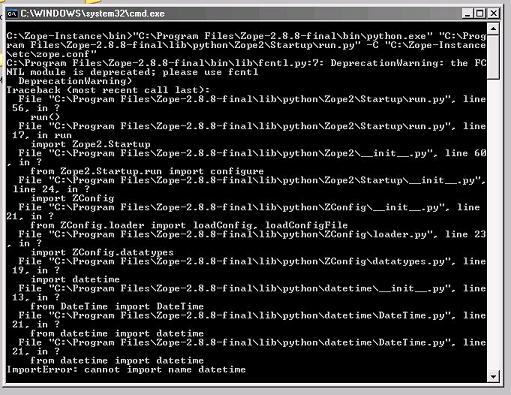
Here is the .bat file: @set PYTHON=C:\Program Files\Zope-2.8.8-final\bin\python.exe @set ZOPE_HOME=C:\Program Files\Zope-2.8.8-final @set INSTANCE_HOME=C:\Zope-Instance @set SOFTWARE_HOME=C:\Program Files\Zope-2.8.8-final\lib\python @set CONFIG_FILE=C:\Zope-Instance\etc\zope.conf @set PYTHONPATH=%SOFTWARE_HOME% @set ZOPE_RUN=%SOFTWARE_HOME%\Zope2\Startup\run.py "%PYTHON%" "%ZOPE_RUN%" -C "%CONFIG_FILE%" %1 %2 %3 %4 %5 %6 %7 pause It is exactly as provided in the Zope 2.8.8 installation kit, except that I added the pause at the end so I could take a screen shot. I run it just by clicking on its Windows icon, so there are no calling parameters. I just noticed that the screen shot I sent earlier did not show the whole session, so I attach a complete one here. Yes, ...ateTime\DateTuime.py my last message was a typo. ~ Thanks again ~ Ken -----Original Message----- From: rawsystems@gmail.com [mailto:rawsystems@gmail.com] Sent: Thursday, January 18, 2007 10:19 PM To: Ken Winter; 'Zope List' Subject: Re: [Zope] FW: Problem Starting Zope after Installation I wonder why it was not cased in the output in your first message. This is strange. Which batch file do you start it with? can you post it here? Which version of python are you using? (just for giggles) Bobb PS: If you're early in the installation... which you are it looks like you may want to "punt" and try it again. PSS: I assume your ...ateTime\DateTuime.py below is a typeo, otherwise, that's your problem.
----- Original Message ----- From: "Ken Winter" <ken@sunward.org> To: "'Zope List'" <zope@zope.org> Sent: Friday, January 19, 2007 8:52 AM Subject: RE: [Zope] FW: Problem Starting Zope after Installation
Here is the .bat file:
@set PYTHON=C:\Program Files\Zope-2.8.8-final\bin\python.exe @set ZOPE_HOME=C:\Program Files\Zope-2.8.8-final @set INSTANCE_HOME=C:\Zope-Instance @set SOFTWARE_HOME=C:\Program Files\Zope-2.8.8-final\lib\python @set CONFIG_FILE=C:\Zope-Instance\etc\zope.conf @set PYTHONPATH=%SOFTWARE_HOME% @set ZOPE_RUN=%SOFTWARE_HOME%\Zope2\Startup\run.py "%PYTHON%" "%ZOPE_RUN%" -C "%CONFIG_FILE%" %1 %2 %3 %4 %5 %6 %7 pause
It is exactly as provided in the Zope 2.8.8 installation kit, except that I added the "pause" at the end so I could take a screen shot. I run it just by clicking on its Windows icon, so there are no calling parameters.
I just noticed that the screen shot I sent earlier did not show the whole "session", so I attach a complete one here.
Yes, "...ateTime\DateTuime.py" my last message was a typo. < <~ Thanks again <~ Ken
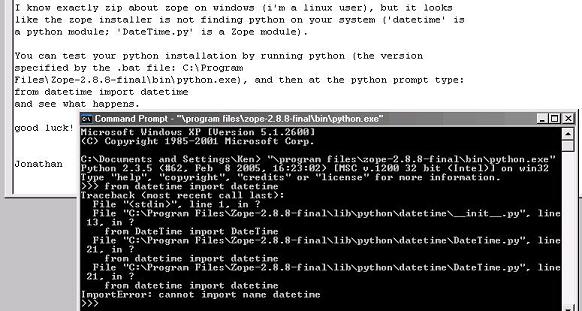
I know exactly zip about zope on windows (i'm a linux user), but it looks like the zope installer is not finding python on your system ('datetime' is a python module; 'DateTime.py' is a Zope module). You can test your python installation by running python (the version specified by the .bat file: C:\Program Files\Zope-2.8.8-final\bin\python.exe), and then at the python prompt type: from datetime import datetime and see what happens. good luck! Jonathan
Jonathan ~ I tried your suggestion and got basically the same error (see attached screen shot). What does that imply about what to do next? ~ Thanks again ~ Ken
-----Original Message----- From: Jonathan [mailto:dev101@magma.ca] Sent: Friday, January 19, 2007 9:22 AM To: Ken Winter; 'Zope List' Subject: Re: [Zope] FW: Problem Starting Zope after Installation ...
I know exactly zip about zope on windows (i'm a linux user), but it looks like the zope installer is not finding python on your system ('datetime' is a python module; 'DateTime.py' is a Zope module).
You can test your python installation by running python (the version specified by the .bat file: C:\Program Files\Zope-2.8.8-final\bin\python.exe), and then at the python prompt type: from datetime import datetime and see what happens.
good luck!
Jonathan
----- Original Message ----- From: "Ken Winter" <ken@sunward.org> To: "'Jonathan'" <dev101@magma.ca>; "'Zope List'" <zope@zope.org> Sent: Friday, January 19, 2007 9:45 AM Subject: RE: [Zope] FW: Problem Starting Zope after Installation
Jonathan ~
I tried your suggestion and got basically the same error (see attached screen shot). What does that imply about what to do next?
~ Thanks again ~ Ken
I just checked an older version of python (2.3.4) on my linux server and the 'from datetime import datetime' command worked just fine, so your 2.3.5 version should have 'datetime'. All i can think of is that your python installation is pooched. Can you 'uninstall' python, and then download/re-install a fresh version? Jonathan
-----Original Message----- From: Jonathan [mailto:dev101@magma.ca] Sent: Friday, January 19, 2007 9:22 AM To: Ken Winter; 'Zope List' Subject: Re: [Zope] FW: Problem Starting Zope after Installation ...
I know exactly zip about zope on windows (i'm a linux user), but it looks like the zope installer is not finding python on your system ('datetime' is a python module; 'DateTime.py' is a Zope module).
You can test your python installation by running python (the version specified by the .bat file: C:\Program Files\Zope-2.8.8-final\bin\python.exe), and then at the python prompt type: from datetime import datetime and see what happens.
good luck!
Jonathan

I just checked an older version of python (2.3.4) on my linux server and the 'from datetime import datetime' command worked just fine, so your 2.3.5 version should have 'datetime'. All i can think of is that your python installation is pooched. Can you 'uninstall' python, and then download/re-install a fresh version?
Zope for Windows has its own Python included and it is installed by default at c:\Program files\Zope....\bin\python.exe I've just tried on my vmware Windows installation to download Zope 2.8.8 final from zope.org and install it. It just works, even without 'work as service' option. from datetime import datetime works as well. Python 2.3.5 (#62, Feb 8 2005, 16:23:02) [MSC v.1200 32 bit (Intel)] on win32 Type "help", "copyright", "credits" or "license" for more information.
from datetime import datetime exit 'Use Ctrl-Z plus Return to exit.' ^Z
I'm not sure why it fails on your system. Try googling for datetime problems. -- Maciej Wisniowski
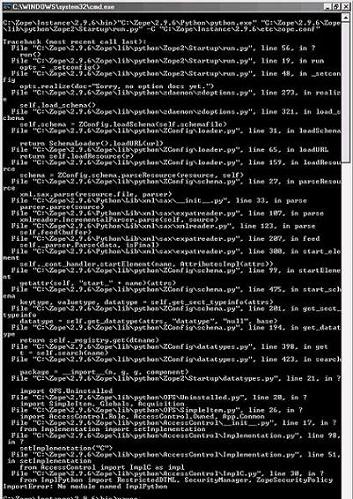
I just uninstalled *both* Zope and Python, then downloaded and installed Zope 2.9.6 (rather than 2.8.8, since I just heard that my server is upgrading). Trying to run this yielded the attached error, which at least is a bit different from the previous one. In case you can't read the attachment, the last couple of lines say: File "C:Zope\2.9.6\Zope\lib\python\AccessControl\Implementation.py", line 51, in setImplementation From AccessControl ImplC as impl File "C:Zope\2.9.6\Zope\lib\python\AccessControl\ImplC.py", line 30, in ? From ImplPython import RestrictedDTML, SecurityManager, ZopeSecurityPolicy ImportError: Non module named ImplPython I then tried downloading and (re-)installing Python. This didn't change the above result at all. ~ Ken
-----Original Message----- From: Jonathan [mailto:dev101@magma.ca] Sent: Friday, January 19, 2007 9:59 AM To: Ken Winter; 'Zope List' Subject: Re: [Zope] FW: Problem Starting Zope after Installation ...
I just checked an older version of python (2.3.4) on my linux server and the 'from datetime import datetime' command worked just fine, so your 2.3.5 version should have 'datetime'. All i can think of is that your python installation is pooched. Can you 'uninstall' python, and then download/re-install a fresh version?
Jonathan

--On 19. Januar 2007 12:01:06 -0500 Ken Winter <ken@sunward.org> wrote:
I just uninstalled *both* Zope and Python, then downloaded and installed Zope 2.9.6 (rather than 2.8.8, since I just heard that my server is upgrading). Trying to run this yielded the attached error, which at least is a bit different from the previous one. In case you can't read the attachment, the last couple of lines say:
File "C:Zope\2.9.6\Zope\lib\python\AccessControl\Implementation.py", line 51, in setImplementation From AccessControl ImplC as impl File "C:Zope\2.9.6\Zope\lib\python\AccessControl\ImplC.py", line 30, in ? From ImplPython import RestrictedDTML, SecurityManager, ZopeSecurityPolicy ImportError: Non module named ImplPython
This indicates that you haven't compiled or installed Zope properly. Triple check your installation procedure. Usually this never happens when you follow the standard "configure; make install; bin/mkzopeinstance.py" dance. -aj
Andreas ~ I'm installing the "Zope for Dummies" version (appropriate to my level of expertise): Download Zope-2.9.6-win32.exe, double-click on it, and take all the defaults (except that I don't install it as a Windows service). I'm not sure how even I can do that wrong. Is there a way? ~ Thanks ~ Ken
-----Original Message----- From: Andreas Jung [mailto:lists@zopyx.com] Sent: Friday, January 19, 2007 12:06 PM To: Ken Winter; 'Jonathan'; 'Zope List' Subject: RE: [Zope] FW: Problem Starting Zope after Installation
--On 19. Januar 2007 12:01:06 -0500 Ken Winter <ken@sunward.org> wrote:
I just uninstalled *both* Zope and Python, then downloaded and installed Zope 2.9.6 (rather than 2.8.8, since I just heard that my server is upgrading). Trying to run this yielded the attached error, which at least is a bit different from the previous one. In case you can't read the attachment, the last couple of lines say:
File "C:Zope\2.9.6\Zope\lib\python\AccessControl\Implementation.py", line 51, in setImplementation From AccessControl ImplC as impl File "C:Zope\2.9.6\Zope\lib\python\AccessControl\ImplC.py", line 30, in ? From ImplPython import RestrictedDTML, SecurityManager, ZopeSecurityPolicy ImportError: Non module named ImplPython
This indicates that you haven't compiled or installed Zope properly. Triple check your installation procedure. Usually this never happens when you follow the standard "configure; make install; bin/mkzopeinstance.py" dance.
-aj
--On 19. Januar 2007 15:34:35 -0500 Ken Winter <ken@sunward.org> wrote:
Andreas ~
I'm installing the "Zope for Dummies" version (appropriate to my level of expertise): Download Zope-2.9.6-win32.exe, double-click on it, and take all the defaults (except that I don't install it as a Windows service). I'm not sure how even I can do that wrong. Is there a way?
The Windows installer works fine for me (running Zope as service and from the command-line). -aj
google is your friend. http://plone.org/documentation/error/importerror-no-module-named-implpython bobb ----- Original Message ----- From: "Ken Winter" <ken@sunward.org> To: "'Jonathan'" <dev101@magma.ca>; "'Zope List'" <zope@zope.org> Sent: Friday, January 19, 2007 12:01 PM Subject: RE: [Zope] FW: Problem Starting Zope after Installation I just uninstalled *both* Zope and Python, then downloaded and installed Zope 2.9.6 (rather than 2.8.8, since I just heard that my server is upgrading). Trying to run this yielded the attached error, which at least is a bit different from the previous one. In case you can't read the attachment, the last couple of lines say: File "C:Zope\2.9.6\Zope\lib\python\AccessControl\Implementation.py", line 51, in setImplementation From AccessControl ImplC as impl File "C:Zope\2.9.6\Zope\lib\python\AccessControl\ImplC.py", line 30, in ? From ImplPython import RestrictedDTML, SecurityManager, ZopeSecurityPolicy ImportError: Non module named ImplPython I then tried downloading and (re-)installing Python. This didn't change the above result at all. ~ Ken
-----Original Message----- From: Jonathan [mailto:dev101@magma.ca] Sent: Friday, January 19, 2007 9:59 AM To: Ken Winter; 'Zope List' Subject: Re: [Zope] FW: Problem Starting Zope after Installation ...
I just checked an older version of python (2.3.4) on my linux server and the 'from datetime import datetime' command worked just fine, so your 2.3.5 version should have 'datetime'. All i can think of is that your python installation is pooched. Can you 'uninstall' python, and then download/re-install a fresh version?
Jonathan
--------------------------------------------------------------------------------
_______________________________________________ Zope maillist - Zope@zope.org http://mail.zope.org/mailman/listinfo/zope ** No cross posts or HTML encoding! ** (Related lists - http://mail.zope.org/mailman/listinfo/zope-announce http://mail.zope.org/mailman/listinfo/zope-dev )
Thanks Bobb ~ What I got from the reference your provided is that Zope 2.9.6 requires Python 2.4. So, trying to be as thorough as I can in light of messages from other forum participants, I: 1. Uninstalled Python (2.3) and Zope (2.9.6) again. 2. Deleted the remaining files from Zope instance from the previous installation. 3. Searched for any compiled zope files (.pyc) that might be lying around. I didn't find any that were relevant to Zope. 4. Downloaded and installed Python 2.4.4 (from python-2.4.4.msi). 5. Reinstalled Zope 2.9.6 (from Zope-2.9.6-win32.exe). 6. Doubled-clicked on C:\Zope\Instance\2.9.6\bin\runzope.bat. ...and got the same error again. This time I attach a screen shot of just the last few lines of the error message, which I hope will be more legible. ~ Thanks to all ~ Ken
-----Original Message----- From: rawsystems@gmail.com [mailto:rawsystems@gmail.com] Sent: Friday, January 19, 2007 12:58 PM To: Ken Winter; 'Jonathan'; 'Zope List' Subject: Re: [Zope] FW: Problem Starting Zope after Installation
google is your friend. http://plone.org/documentation/error/importerror-no-module-named- implpython
bobb
----- Original Message ----- From: "Ken Winter" <ken@sunward.org> To: "'Jonathan'" <dev101@magma.ca>; "'Zope List'" <zope@zope.org> Sent: Friday, January 19, 2007 12:01 PM Subject: RE: [Zope] FW: Problem Starting Zope after Installation
I just uninstalled *both* Zope and Python, then downloaded and installed Zope 2.9.6 (rather than 2.8.8, since I just heard that my server is upgrading). Trying to run this yielded the attached error, which at least is a bit different from the previous one. In case you can't read the attachment, the last couple of lines say:
File "C:Zope\2.9.6\Zope\lib\python\AccessControl\Implementation.py", line 51, in setImplementation From AccessControl ImplC as impl File "C:Zope\2.9.6\Zope\lib\python\AccessControl\ImplC.py", line 30, in ? From ImplPython import RestrictedDTML, SecurityManager, ZopeSecurityPolicy ImportError: Non module named ImplPython
I then tried downloading and (re-)installing Python. This didn't change the above result at all.
~ Ken
-----Original Message----- From: Jonathan [mailto:dev101@magma.ca] Sent: Friday, January 19, 2007 9:59 AM To: Ken Winter; 'Zope List' Subject: Re: [Zope] FW: Problem Starting Zope after Installation ...
I just checked an older version of python (2.3.4) on my linux server and the 'from datetime import datetime' command worked just fine, so your 2.3.5 version should have 'datetime'. All i can think of is that your python installation is pooched. Can you 'uninstall' python, and then download/re-install a fresh version?
Jonathan
-------------------------------------------------------------------------- ------
_______________________________________________ Zope maillist - Zope@zope.org http://mail.zope.org/mailman/listinfo/zope ** No cross posts or HTML encoding! ** (Related lists - http://mail.zope.org/mailman/listinfo/zope-announce http://mail.zope.org/mailman/listinfo/zope-dev )

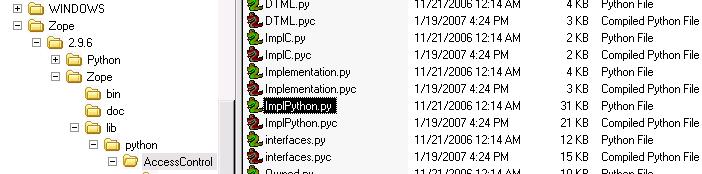
P.S. Attached is a screen shot showing that ImplPython.py and ImplPython.pyc do exist on my machine.
-----Original Message----- From: zope-bounces@zope.org [mailto:zope-bounces@zope.org] On Behalf Of Ken Winter Sent: Friday, January 19, 2007 4:54 PM To: rawsystems@gmail.com; 'Jonathan'; 'Zope List'; 'Gabriel Genellina' Subject: RE: [Zope] FW: Problem Starting Zope after Installation
Thanks Bobb ~
What I got from the reference your provided is that Zope 2.9.6 requires Python 2.4. So, trying to be as thorough as I can in light of messages from other forum participants, I:
1. Uninstalled Python (2.3) and Zope (2.9.6) again. 2. Deleted the remaining files from Zope instance from the previous installation. 3. Searched for any compiled zope files (.pyc) that might be lying around. I didn't find any that were relevant to Zope. 4. Downloaded and installed Python 2.4.4 (from python-2.4.4.msi). 5. Reinstalled Zope 2.9.6 (from Zope-2.9.6-win32.exe). 6. Doubled-clicked on C:\Zope\Instance\2.9.6\bin\runzope.bat.
...and got the same error again. This time I attach a screen shot of just the last few lines of the error message, which I hope will be more legible.
~ Thanks to all ~ Ken
-----Original Message----- From: rawsystems@gmail.com [mailto:rawsystems@gmail.com] Sent: Friday, January 19, 2007 12:58 PM To: Ken Winter; 'Jonathan'; 'Zope List' Subject: Re: [Zope] FW: Problem Starting Zope after Installation
google is your friend. http://plone.org/documentation/error/importerror-no-module-named- implpython
bobb
----- Original Message ----- From: "Ken Winter" <ken@sunward.org> To: "'Jonathan'" <dev101@magma.ca>; "'Zope List'" <zope@zope.org> Sent: Friday, January 19, 2007 12:01 PM Subject: RE: [Zope] FW: Problem Starting Zope after Installation
I just uninstalled *both* Zope and Python, then downloaded and installed Zope 2.9.6 (rather than 2.8.8, since I just heard that my server is upgrading). Trying to run this yielded the attached error, which at least is a bit different from the previous one. In case you can't read the attachment, the last couple of lines say:
File "C:Zope\2.9.6\Zope\lib\python\AccessControl\Implementation.py", line 51, in setImplementation From AccessControl ImplC as impl File "C:Zope\2.9.6\Zope\lib\python\AccessControl\ImplC.py", line 30, in ? From ImplPython import RestrictedDTML, SecurityManager, ZopeSecurityPolicy ImportError: Non module named ImplPython
I then tried downloading and (re-)installing Python. This didn't change the above result at all.
~ Ken
-----Original Message----- From: Jonathan [mailto:dev101@magma.ca] Sent: Friday, January 19, 2007 9:59 AM To: Ken Winter; 'Zope List' Subject: Re: [Zope] FW: Problem Starting Zope after Installation ...
I just checked an older version of python (2.3.4) on my linux server and the 'from datetime import datetime' command worked just fine, so your 2.3.5 version should have 'datetime'. All i can think of is that your python installation is pooched. Can you 'uninstall' python, and then download/re-install a fresh version?
Jonathan
------------------------------------------------------------------------ -- ------
_______________________________________________ Zope maillist - Zope@zope.org http://mail.zope.org/mailman/listinfo/zope ** No cross posts or HTML encoding! ** (Related lists - http://mail.zope.org/mailman/listinfo/zope-announce http://mail.zope.org/mailman/listinfo/zope-dev )
--On 19. Januar 2007 17:14:42 -0500 Ken Winter <ken@sunward.org> wrote:
P.S. Attached is a screen shot showing that ImplPython.py and ImplPython.pyc do exist on my machine.
-----Original Message----- From: zope-bounces@zope.org [mailto:zope-bounces@zope.org] On Behalf Of Ken Winter Sent: Friday, January 19, 2007 4:54 PM To: rawsystems@gmail.com; 'Jonathan'; 'Zope List'; 'Gabriel Genellina' Subject: RE: [Zope] FW: Problem Starting Zope after Installation
Thanks Bobb ~
What I got from the reference your provided is that Zope 2.9.6 requires Python 2.4. So, trying to be as thorough as I can in light of messages from other forum participants, I:
1. Uninstalled Python (2.3) and Zope (2.9.6) again. 2. Deleted the remaining files from Zope instance from the previous installation. 3. Searched for any compiled zope files (.pyc) that might be lying around. I didn't find any that were relevant to Zope. 4. Downloaded and installed Python 2.4.4 (from python-2.4.4.msi). 5. Reinstalled Zope 2.9.6 (from Zope-2.9.6-win32.exe). 6. Doubled-clicked on C:\Zope\Instance\2.9.6\bin\runzope.bat.
And why do you need to install Python 2.4.4 in *addition* to Zope? The Windows installer comes with its own Python installation. Likely you are messing up the registry somehow. So why the second Python installation? -aj
I have installed Python in addition to Zope because some of the respondents in this thread have said I should, while others have said it's redundant in terms of getting Zope to work. Anyway, the presence or absence of the independent Python installation doesn't make a white of difference to my problem, which still persists. ~ Ken
-----Original Message----- From: Andreas Jung [mailto:lists@zopyx.com] Sent: Saturday, January 20, 2007 2:51 AM To: Ken Winter; rawsystems@gmail.com; 'Jonathan'; 'Zope List'; 'Gabriel Genellina' Subject: RE: [Zope] FW: Problem Starting Zope after Installation ...
And why do you need to install Python 2.4.4 in *addition* to Zope? The Windows installer comes with its own Python installation. Likely you are messing up the registry somehow. So why the second Python installation?
-aj
--On 20. Januar 2007 09:56:22 -0500 Ken Winter <ken@sunward.org> wrote:
I have installed Python in addition to Zope because some of the respondents in this thread have said I should, while others have said it's redundant in terms of getting Zope to work. Anyway, the presence or absence of the independent Python installation doesn't make a white of difference to my problem, which still persists.
Hard too believe...likely you've messed up your system or the registry. No idea. -aj
I give up on Zope just because a I can't get over this hurdle. Can anybody offer any tools or resources or suggestions (Zope-related or otherwise) for diagnosing whether and how I have messed up my system or registry, in a way that prevents Zope from working? ~ TIA ~ Ken
-----Original Message----- From: Andreas Jung [mailto:lists@zopyx.com] Sent: Saturday, January 20, 2007 10:00 AM To: Ken Winter; 'Andreas Jung'; rawsystems@gmail.com; 'Jonathan'; 'Zope List'; 'Gabriel Genellina' Subject: RE: [Zope] FW: Problem Starting Zope after Installation
--On 20. Januar 2007 09:56:22 -0500 Ken Winter <ken@sunward.org> wrote:
I have installed Python in addition to Zope because some of the respondents in this thread have said I should, while others have said it's redundant in terms of getting Zope to work. Anyway, the presence or absence of the independent Python installation doesn't make a white of difference to my problem, which still persists.
Hard too believe...likely you've messed up your system or the registry. No idea.
-aj
Oops; I meant to say "I **don't want to** give up on Zope just because of this hurdle." If I were giving up I wouldn't be asking for further help. ~ Ken
-----Original Message----- From: zope-bounces@zope.org [mailto:zope-bounces@zope.org] On Behalf Of Ken Winter Sent: Monday, January 22, 2007 12:44 PM To: 'Andreas Jung'; rawsystems@gmail.com; 'Jonathan'; 'Zope List'; 'Gabriel Genellina' Subject: RE: [Zope] FW: Problem Starting Zope after Installation
I give up on Zope just because a I can't get over this hurdle. Can anybody offer any tools or resources or suggestions (Zope-related or otherwise) for diagnosing whether and how I have messed up my system or registry, in a way that prevents Zope from working?
~ TIA ~ Ken
-----Original Message----- From: Andreas Jung [mailto:lists@zopyx.com] Sent: Saturday, January 20, 2007 10:00 AM To: Ken Winter; 'Andreas Jung'; rawsystems@gmail.com; 'Jonathan'; 'Zope List'; 'Gabriel Genellina' Subject: RE: [Zope] FW: Problem Starting Zope after Installation
--On 20. Januar 2007 09:56:22 -0500 Ken Winter <ken@sunward.org> wrote:
I have installed Python in addition to Zope because some of the respondents in this thread have said I should, while others have said it's redundant in terms of getting Zope to work. Anyway, the presence or absence of the independent Python installation doesn't make a white of difference to my problem, which still persists.
Hard too believe...likely you've messed up your system or the registry. No idea.
-aj
_______________________________________________ Zope maillist - Zope@zope.org http://mail.zope.org/mailman/listinfo/zope ** No cross posts or HTML encoding! ** (Related lists - http://mail.zope.org/mailman/listinfo/zope-announce http://mail.zope.org/mailman/listinfo/zope-dev )

-----BEGIN PGP SIGNED MESSAGE----- Hash: SHA1 Ken Winter wrote:
I give up on Zope just because a I can't get over this hurdle. Can anybody offer any tools or resources or suggestions (Zope-related or otherwise) for diagnosing whether and how I have messed up my system or registry, in a way that prevents Zope from working?
Caveat: I haven't run Windows at *all* for years now. That said: 1. Run 'regedit.exe', and search for keys related to 'zope' or 'python'. If you have no other Zope or Python stuff on your machine, zap all such keys. 2. Try this on another, "fresh" machine (one with no preexisting Zope / Python install). 3. Ensure that you install Zope into an NTFS partition, rather than a FAT variant (likely superstition at this point). Hope that helps, Tres. - -- =================================================================== Tres Seaver +1 540-429-0999 tseaver@palladion.com Palladion Software "Excellence by Design" http://palladion.com -----BEGIN PGP SIGNATURE----- Version: GnuPG v1.4.2.2 (GNU/Linux) Comment: Using GnuPG with Mozilla - http://enigmail.mozdev.org iD8DBQFFtRYs+gerLs4ltQ4RAgo6AJ9HP3JkPNo0KamS6UKONCnff+EM1wCfYj75 H9xAQUyFT9aAUxwxKfDxP9Y= =Q4O6 -----END PGP SIGNATURE-----
Tres ~ Excellent ideas - thanks! I'm going on vacation for two weeks, but as soon as I'm back I will resume work by doing what you suggest, and will report back the results. ~ Ken
-----Original Message----- From: zope-bounces@zope.org [mailto:zope-bounces@zope.org] On Behalf Of Tres Seaver Sent: Monday, January 22, 2007 2:53 PM To: zope@zope.org Subject: [Zope] Re: FW: Problem Starting Zope after Installation
-----BEGIN PGP SIGNED MESSAGE----- Hash: SHA1
Ken Winter wrote:
I give up on Zope just because a I can't get over this hurdle. Can anybody offer any tools or resources or suggestions (Zope-related or otherwise) for diagnosing whether and how I have messed up my system or registry, in a way that prevents Zope from working?
Caveat: I haven't run Windows at *all* for years now. That said:
1. Run 'regedit.exe', and search for keys related to 'zope' or 'python'. If you have no other Zope or Python stuff on your machine, zap all such keys.
2. Try this on another, "fresh" machine (one with no preexisting Zope / Python install).
3. Ensure that you install Zope into an NTFS partition, rather than a FAT variant (likely superstition at this point).
Hope that helps,
Tres. - -- =================================================================== Tres Seaver +1 540-429-0999 tseaver@palladion.com Palladion Software "Excellence by Design" http://palladion.com -----BEGIN PGP SIGNATURE----- Version: GnuPG v1.4.2.2 (GNU/Linux) Comment: Using GnuPG with Mozilla - http://enigmail.mozdev.org
iD8DBQFFtRYs+gerLs4ltQ4RAgo6AJ9HP3JkPNo0KamS6UKONCnff+EM1wCfYj75 H9xAQUyFT9aAUxwxKfDxP9Y= =Q4O6 -----END PGP SIGNATURE-----
_______________________________________________ Zope maillist - Zope@zope.org http://mail.zope.org/mailman/listinfo/zope ** No cross posts or HTML encoding! ** (Related lists - http://mail.zope.org/mailman/listinfo/zope-announce http://mail.zope.org/mailman/listinfo/zope-dev )
I'm still hung up on the directory name... mine has C:\Zope288final\lib\python\DateTime w/ caps, but your print screen, which has "datetime" and not "DateTime". If this is not caps, this is your error. Please humor me and double check the case. bobb ----- Original Message ----- From: "Jonathan" <dev101@magma.ca> To: "Ken Winter" <ken@sunward.org>; "'Zope List'" <zope@zope.org> Sent: Friday, January 19, 2007 9:59 AM Subject: Re: [Zope] FW: Problem Starting Zope after Installation
----- Original Message ----- From: "Ken Winter" <ken@sunward.org> To: "'Jonathan'" <dev101@magma.ca>; "'Zope List'" <zope@zope.org> Sent: Friday, January 19, 2007 9:45 AM Subject: RE: [Zope] FW: Problem Starting Zope after Installation
Jonathan ~
I tried your suggestion and got basically the same error (see attached screen shot). What does that imply about what to do next?
~ Thanks again ~ Ken
I just checked an older version of python (2.3.4) on my linux server and the 'from datetime import datetime' command worked just fine, so your 2.3.5 version should have 'datetime'. All i can think of is that your python installation is pooched. Can you 'uninstall' python, and then download/re-install a fresh version?
Jonathan
-----Original Message----- From: Jonathan [mailto:dev101@magma.ca] Sent: Friday, January 19, 2007 9:22 AM To: Ken Winter; 'Zope List' Subject: Re: [Zope] FW: Problem Starting Zope after Installation ...
I know exactly zip about zope on windows (i'm a linux user), but it looks like the zope installer is not finding python on your system ('datetime' is a python module; 'DateTime.py' is a Zope module).
You can test your python installation by running python (the version specified by the .bat file: C:\Program Files\Zope-2.8.8-final\bin\python.exe), and then at the python prompt type: from datetime import datetime and see what happens.
good luck!
Jonathan
_______________________________________________ Zope maillist - Zope@zope.org http://mail.zope.org/mailman/listinfo/zope ** No cross posts or HTML encoding! ** (Related lists - http://mail.zope.org/mailman/listinfo/zope-announce http://mail.zope.org/mailman/listinfo/zope-dev )

At Friday 19/1/2007 11:45, Ken Winter wrote:
I tried your suggestion and got basically the same error (see attached screen shot). What does that imply about what to do next?
Something is really *wrong* with your Zope install - C:\Program Files\Zope-2.8.8-final\lib\python\DateTime should be the directory name, not "datetime". That directory hides the standard Python "datetime" module. I've just downloaded 2.8.8 and installed it and the directory name is correct, DateTime. So I think you should delete all traces of your Zope installation and start again. -- Gabriel Genellina Softlab SRL __________________________________________________ Pregunt�. Respond�. Descubr�. Todo lo que quer�as saber, y lo que ni imaginabas, est� en Yahoo! Respuestas (Beta). �Probalo ya! http://www.yahoo.com.ar/respuestas
participants (7)
-
 Andreas Jung
 -
 Gabriel Genellina
 -
 Jonathan
 -
 Ken Winter
 -
 Maciej Wisniowski
 -
 rawsystems@gmail.com
 -
 Tres Seaver